Databasus

PostgreSQL backup tool with Point-in-time-recovery and restore verification

Databasus is a free, open source and self-hosted tool to backup PostgreSQL. Make backups with different storages (S3, Google Drive, FTP, etc.) and notifications about progress (Slack, Discord, Telegram, etc.). With a focus on Point-in-Time Recovery at low RPO/RTO

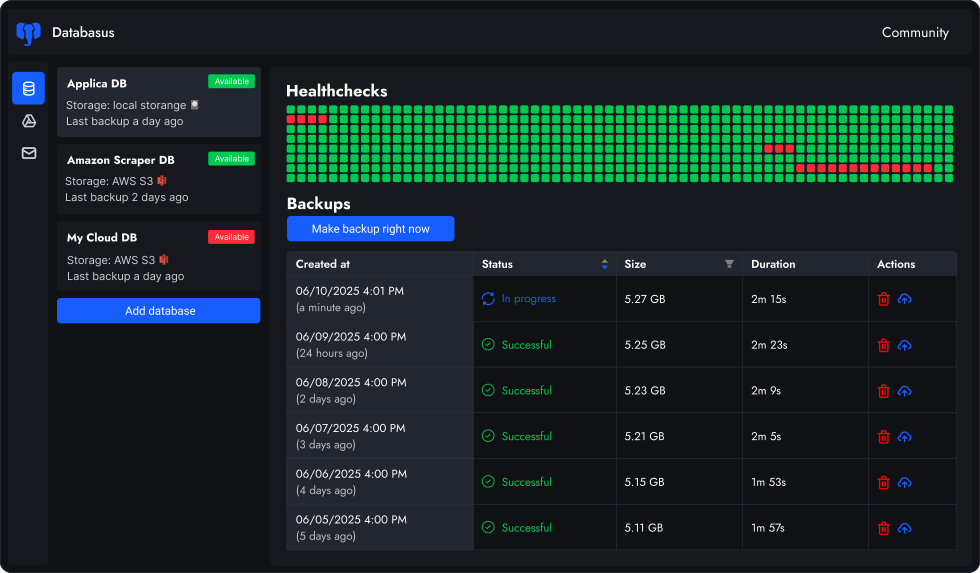
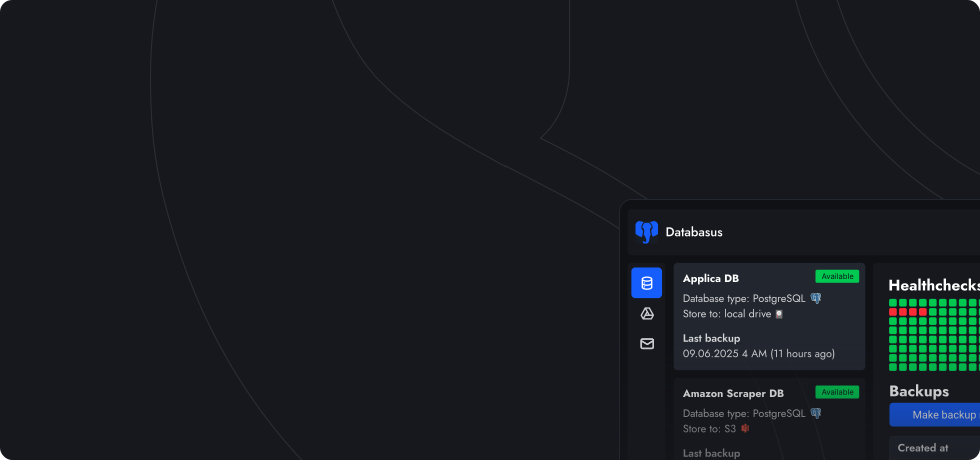
Databasus dashboard interface
Support by Anthropic and OpenAI OSS
Supported by both Anthropic and OpenAI open source programs. Learn more →
Overview

Features

Databasus provides everything you need for reliable production backup management. From automated scheduling to backups encryption. Suitable well for both individual developers with personal projects, DevOps teams and enterprises

1

Scheduled backups

Scheduled backups

Backup is a thing that should be done in specified time on regular basis. So we provide many options: hourly, daily, weekly, monthly, cron, etc.

2

Configurable health checks

Health checks

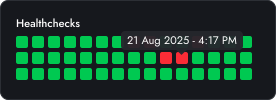
Each minute (or any another amount of time) the system will ping your database and show you the history of attempts

The database can be considered as down after 3 failed attempts or so. Once DB is healthy again - you receive notification too

3

Many destinations to store

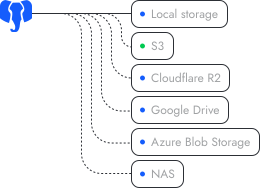
Files are kept on VPS, cloud storages and other places. You can choose any storage you. Files are always owned by you. View all →

Storage
4

Notifications

You can receive notifications about success or fail of the process. This is useful for developers or DevOps teams. View all →

Notifications
5

Self hosted via Docker

Databasus runs on your PC or VPS. Therefore, all your data is owned by you and secured. Deploy takes about 2 minutes via script, Docker or k8s

Docker
6

Open source and free

The project is fully open source, free and have Apache 2.0 license. You can copy and fork the code on your own. Open for enterprise as well

GitHub
7

Restore verification

A backup that finishes without error is not the same as a backup you can restore. Databasus periodically pulls the latest backup, restores it into a throwaway database container and reports the outcome. Read more →

PostgreSQL
8

Access management

for teams
Access management

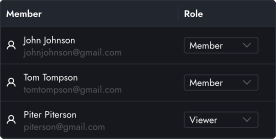
Provide access for users to view or manage DBs. Separate teams and projects. Suitable for DevOps teams and developers. Read more →

9

Audit logs

for teams
Audit logs

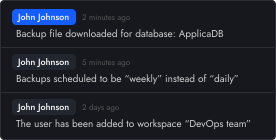
Track all system activities with comprehensive audit logs. You can view access and changes history for each user (backup downloads, schedule changes, config updates, etc.). Read more →

10

Security

Enterprise-grade encryption protects sensitive data and backups. Read-only database access prevents data corruption. Everything this does not require any knowledge and ready out of the box from the start automatically. Read more →

Security
11

Logical, physical, incremental and WAL backups

Databasus supports logical, physical (full and incremental) backups with WAL-streaming for Point-in-Time Recovery. This makes Databasus suitable for disaster recovery, and works equally well with self-hosted and cloud databases — use remote mode for cloud-managed or publicly accessible DBs. Physical backups are made over PG 17 native backups, read more here about this.

4-minutes overview

How to use Databasus?

Watch in this video how to connect your database, how to configure backups schedule, how to download and restore backups, how to add team members and what is users' audit logs

Rostislav Dugin

Rostislav Dugin

Developer of Databasus

How to use Databasus (overview)?
Databases

Supported databases

Databasus supports PostgreSQL, MySQL, MariaDB and MongoDB. You can backup and restore all of them with the same tool. Primary focus is on PostgreSQL, but MySQL, MariaDB and MongoDB are supported too

PostgreSQL

PostgreSQL

PostgreSQL is the primary database supported by Databasus. All versions from 12 to 18 are supported

MySQL

MySQL

MySQL is the second most popular database in the world. You can backup and restore your MySQL databases with the same simplicity

MariaDB

MariaDB

MariaDB is supported with the same features as MySQL. You can backup and restore your MariaDB databases seamlessly

MongoDB

MongoDB

MongoDB is the most popular NoSQL database. You can backup and restore your MongoDB databases with the same easy-to-use interface

Process

How to make backups?

The main priority for Databasus is simplicity, right now this is the easiest tool to backup PostgreSQL in the world. To make backups, you need to follow 4 steps. After that, you will be able to restore in one click

Step 1

Select required schedule

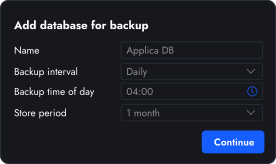
You can choose any time you need: daily, weekly, monthly, particular time (like 4 AM) and cron cycles

For week interval you need to specify particular day, for month you need to specify particular day

If your database is large, we recommend you choosing the time when there are decrease in traffic

Step 1
Step 2

Enter your database info

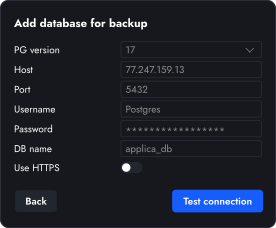
Enter credentials of your PostgreSQL database, select version and target DB. Also choose whether SSL is required

Databasus, by default, compress backups at balance level to not slow down backup process (~20% slower) and save x4-x8 of the space (that decreasing network traffic)

Step 2
Step 3

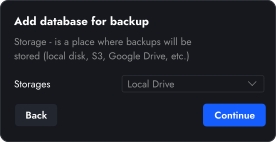
Choose storage for backups

You can keep files with backups locally, in S3, in Google Drive, NAS, Dropbox and other services

Please keep in mind that you need to have enough space on the storage

Step 3
Step 4

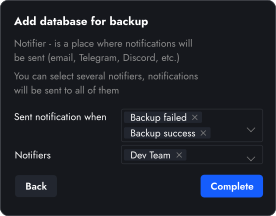
Choose where you want to receive notifications (optional)

When backup succeed or failed, Databasus is able to send you notification. It can be chat with DevOps, your emails or even webhook of your team

We are going to support the most of popular messangers and platforms

Step 4
Get started

How to install?

Databasus support many ways of installation. Both local and cloud are supported. Both ways are extremely simple and easy to use even for those who has no experience in administration or DevOps

Automated script (recommended)
The installation script will install Docker with Docker Compose (if not already installed), set up Databasus and configure automatic startup on system reboot.
sudo apt-get install -y curl && \
sudo curl -sSL https://raw.githubusercontent.com/databasus/databasus/refs/heads/main/install-databasus.sh | sudo bash
Read more about installation
How to install Databasus
FAQ

Frequent questions

The goal of Databasus — make backing up as simple as possible for single developers (as well as DevOps) and teams. UI makes it easy to create backups and visualizes the progress and restores anything in couple of clicks

1

What is Databasus and why should I use it instead of hand-rolled scripts?

Databasus is an Apache 2.0 licensed, self-hosted service backing up databases. It differs from shell scripts in that it has a frontend for scheduling tasks, compressing and storing archives on multiple targets (local disk, S3, Google Drive, NAS, Dropbox, SFTP, rclone, etc.), configuring retention policies to automatically prune old backups and notifying your team when tasks finish or fail — all without hand-rolled code
2

How do I install Databasus in the quickest manner?

Databasus supports multiple installation methods: automated script, Docker, Docker Compose and Kubernetes with Helm. The quickest route is to run the one-line cURL installer, which fetches the current Docker image, creates a docker-compose.yml and boots up the service so it will automatically restart on reboots. For Kubernetes environments, use the official Helm chart for production-ready deployments. Overall time is usually less than two minutes on a typical VPS.
3

How restore verification works?

Databasus runs a small verification agent on a host you control. On every scheduled run the agent downloads the latest backup. It restores the backup into a throwaway database container. Then it sanity-checks the restored database against the source. The result is reported back — including the restore exit code and per-table row counts. Schedules support after backup, hourly, daily, weekly, monthly or a UTC cron expression. Failures can be sent through any notifier wired to the database — Slack, Teams, Discord, email and others.
4

How does Databasus ensure security?

Databasus enforces security on three levels: (1) Sensitive data encryption — all passwords, tokens and credentials are encrypted with AES-256-GCM and stored separately from the database; (2) Backup encryption — each backup file is encrypted with a unique key derived from a master key, backup ID and random salt, making backups useless without your encryption key even if someone gains storage access; (3) Read-only database access — Databasus only requires SELECT permissions and performs comprehensive checks to ensure no write privileges exist, preventing data corruption even if the tool is compromised.

Beyond runtime, security and reliability are engineered into every commit and PR: CodeQL static analysis, CodeRabbit with gitleaks and semgrep, Dependabot CVE monitoring, Trivy image and Dockerfile scans, and periodic Codex Security audits from OpenAI. Integration tests run against real PostgreSQL, MySQL, MariaDB and MongoDB containers and verify full backup-then-restore cycles on every PR. GitHub Actions are pinned to commit SHAs and workflows follow least-privilege permissions.

See Security & reliability engineering for the full pipeline.
5

How do I set up and run my first backup job in Databasus?

To start your very first Databasus backup, simply log in to the dashboard, click on New Backup, select an interval — hourly, daily, weekly, monthly or cron. Then specify the exact run time (e.g., 02:30 for off-peak hours).

Then input your PostgreSQL host, port number, database name, credentials and SSL preference. Choose where the archive should be sent (local path, S3 bucket, Google Drive folder, Dropbox, etc.).

If you need, add notification channels such as email, Slack, Telegram or a webhook and click Save. Databasus instantly validates the info, starts the schedule, runs the initial job and sends live status. So you may restore with one touch when the backup is complete.
6

What is Databasus adoption level?

Databasus is the most widely adopted open-source PostgreSQL backup tool today. At the moment of 17 June 2026, it has been pulled over 1,000,000 times on Docker by DBAs, DevOps engineers, developers and teams worldwide. With 7,500+ GitHub stars, it surpasses pgBackRest (~4,200 stars, available since 2014) and WAL-G (~4,100 stars, available since 2017). Databasus launched in 2025 and outpaced both within its first year. This adoption level reflects strong community trust and preference among database professionals.
7

How is Databasus different from PgBackRest, Barman or pg_dump? Where can I read comparisons?

Databasus prefers simplicity — it provides a modern web interface to manage backups for many databases at once, instead of complex configuration files and command-line tools. Unlike raw pg_dump scripts, it includes built-in scheduling, compression, multiple storage destinations, health monitoring and real-time notifications — all managed through a simple web UI.

At the same time, unlike pgBackRest and WAL-G, Databasus makes physical, incremental and WAL backups on top of PostgreSQL 17's native approach, so it does not reinvent its own backup engine. It connects to your databases remotely, reaching closed networks through an SSH tunnel to the server or a bastion, so databases that are not publicly exposed can still be backed up and managed from a single dashboard. Read how physical and PITR backups implemented.

We have detailed comparison pages for popular backup tools: Databasus vs pg_dump, Databasus vs pgBackRest, Databasus vs Barman, Databasus vs WAL-G and Databasus vs pgBackWeb. Each comparison explains the key differences, pros and cons, and helps you choose the right tool for your needs.
8

Is Databasus supported by Anthropic and OpenAI OSS programs?

Yes, we are proud that Databasus has been recognized as a valuable open-source project by two of the world's leading AI companies. In March 2026, Databasus was accepted into both Claude for Open Source by Anthropic and Codex for Open Source by OpenAI. This is an independent reliability confirmation for us that the project has been evaluated and recognized as critical infrastructure worth supporting. Read more →
9

Is Databasus an alternative to pg_dump?

Not exactly. Databasus focuses on disaster recovery with low RTO and RPO, so it is closer to an alternative to pgBackRest or WAL-G — it tries to make disaster recovery as simple as pg_dump. That said, for logical backups it does serve as a pg_dump alternative and uses pg_dump under the hood, adding a user-friendly web interface, automated scheduling, multiple storage destinations, real-time notifications, health monitoring and backup encryption. Logical backups are also available for MySQL, MariaDB and MongoDB.
10

Which databases does Databasus support?

Databasus supports PostgreSQL, MySQL, MariaDB and MongoDB. However, Databasus was originally created specifically for PostgreSQL and maintains its primary focus on it — providing 100% excellent support and maximum efficiency for PostgreSQL backups.

While MySQL, MariaDB and MongoDB are supported, PostgreSQL remains the core priority with the most optimized features and ongoing development.

For example, Databasus provide native support of physical and WAL backups for PostgreSQL disaster recovery. So Databasus is actually PostgreSQL backup tools, other DBs are just extensions.
11

What backup types does Databasus support?

Databasus supports physical, full, incremental, WAL and logical backups — so it suits both those who want simple logical dumps and those who need a solid disaster recovery tool.
  • Physical — file-level copy of the entire database cluster. Faster backup and restore for large datasets than logical dumps. Built on PostgreSQL 17's native backup mechanism, so we rely on PostgreSQL's own battle-tested tooling instead of re-inventing it
  • Full — a complete, self-contained copy of the cluster, the base every backup chain starts from
  • Incremental — stores only what changed since the previous backup, so backups stay small and fast
  • WAL streaming — continuously captures the database write stream, enabling Point-in-time recovery (PITR). Designed for disaster recovery and near-zero data loss
  • Logical — native dump of the database in its engine-specific binary format. Compressed and streamed directly to storage with no intermediate files

Physical, incremental and WAL backups build on PostgreSQL 17's native mechanism, so they require PostgreSQL 17 or newer; on older versions only logical backups are available. This is intentional: most production databases already run on PostgreSQL 17 or above, and within roughly two years the older versions reach end of life. Databasus aims to become the standard backup tool for databases from PostgreSQL 17 onward.

All of these backups can run over an SSH tunnel if you have a requirement for non-public connections, so the database never has to be exposed publicly.
12

How is AI used in Databasus development?

There have been questions about AI usage in project development. As the project focuses on security, reliability and production usage, we want to be transparent about how AI is used in the development process.

AI is used as a helper for code quality verification, documentation improvement and assistance during development. AI is NOT used for writing entire code or code without tests. The project has solid test coverage, CI/CD automation and verification by experienced developers.

For detailed information about AI usage, development process and security measures, please visit our dedicated FAQ page.
13

How can I join the Databasus community?

You can join our large community of developers, DBAs and DevOps engineers at t.me/databasus_community. The community is a great place to ask questions, share experiences, get help with configuration and stay updated with the latest features and releases.
14

What is the adoption level of Databasus?

Databasus has over 1 million Docker pulls and 7.5k GitHub stars. For comparison, pgBackRest and WAL-G sit at around 4.2k stars each and Barman at about 3.1k, which makes Databasus the most popular database backup tool on GitHub.

It has been accepted into the open-source programs of Anthropic and OpenAI as an important, critical project. Today Databasus is used by enterprises, teams and DevOps engineers, backed by a large and active community.

Databasus has been developed and used since 2023, and open source in widespread use since early 2025. It has been in real production use for a while, so it is battle-tested across many edge cases. Crucially, Databasus does not invent custom ways to back up your data — it relies on PostgreSQL's native, tested implementation instead of building its own workarounds for edge cases.

Our goal is to become the standard backup tool for PostgreSQL from version 17 and above. Databasus is the first backup tool built on PostgreSQL's native, efficient and now standard backup protocol instead of writing its own implementations.